In the article “A Roadmap for Campus Network Upgrades Inspired by a Collection of Photos from Hong Kong Schools’ Computer Rooms,” we use photos as a starting point and, in conjunction with standards for campus informatization development, propose a systematic approach to upgrades. Visual samples allow for quick identification of the server room layout, cabling methods, and equipment usage status, thereby enabling the development of practical implementation plans for subsequent network upgrades that take into account both teaching needs and management requirements.
Step 1: Rapid assessment of the current status of the server room based on images
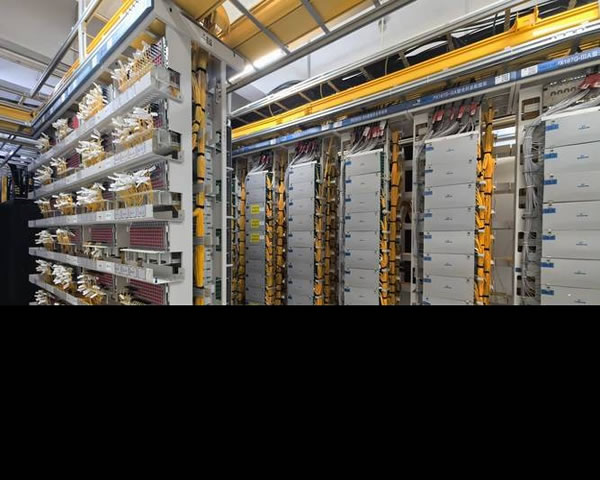
Through a preliminary assessment using the comprehensive collection of photos from Hong Kong school computer rooms, key elements such as cabinet layout, cabling methods, and air conditioning and power supply configurations can be identified. Image analysis can save time on on-site inspections by enabling the early identification of potential safety hazards and capacity bottlenecks. It helps to create a preliminary list of issues, providing direction and a basis for detailed on-site inspections and the development of technical solutions, thereby improving the efficiency of project preparation.
Step 2: Set phased upgrade goals and priorities
Combine the images with the school’s teaching needs to divide the upgrade phases and set priorities. For example, first address the bottlenecks in core switching and firewalls, then move on to optimizing wireless coverage and terminal access. Phased goals should specify time milestones, acceptance criteria, and scope of impact to minimize disruptions to teaching activities and ensure that the outputs of each phase can be quantitatively verified.
Cabling and Server Room Space Optimization
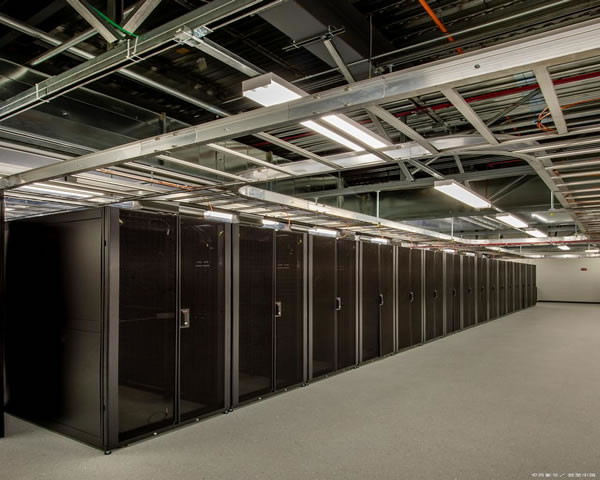
Images often reveal issues such as messy wiring or insufficient space for cables. During upgrades, priority should be given to standardizing vertical and horizontal wiring, planning the capacity of cabinets and cable trays, and ensuring there is enough redundant space. A rational spatial layout supports the management of hot and cold aisles, facilitates maintenance and expansion, reduces future renovation costs, and improves the operational efficiency and reliability of the server room.
Core Switching and Aggregation Layer Design
Based on the device density and port usage shown in the image, the core switching and aggregation layers need to be restructured during the upgrade to ensure bandwidth scalability and link redundancy. A layered design facilitates fault isolation and performance optimization. At the same time, it takes into account the requirements of educational applications for low latency and high availability, providing teachers and students with a stable teaching network experience.
Planning and Implementation of Wireless Coverage
Images help determine the actual locations of AP deployments in the teaching building and the coverage blind spots. Wireless planning should combine floor plans with heat maps to design the AP layout, taking into account the number of concurrent users, teaching scenarios, and spectrum interference issues. Sub-regional piloting and phased deployment can reduce risks, and the power and channel plans can be adjusted based on the results of the pilots.
Terminal Management and Classroom Access Policies
By examining images of computer rooms and classrooms, one can understand the terminal access points and power supply configurations. Upgrade strategies need to be aligned with terminal management solutions, such as hierarchical access, VLAN segmentation, and authentication methods. A unified device management platform is used to distribute configurations, update patches, and conduct asset inventory, thereby ensuring the stability and security of teaching equipment.
Key Points of Network and Information Security Control
Images often indicate the network boundaries and the physical security status of the server room. In the upgrade process, security measures such as firewalls, intrusion detection, access control, and log auditing should be strengthened. Establish hierarchical permission management and backup strategies, and develop a security reinforcement checklist in line with educational data protection requirements to ensure the privacy of teachers and students as well as the availability and compliance of teaching resources.
Layout of power supply, cooling, and environmental monitoring equipment
The UPS, air conditioning, and exhaust conditions can be intuitively assessed from the images. During upgrades, it is necessary to evaluate power supply redundancy, cooling capacity, and environmental monitoring coverage. It is recommended to implement remote monitoring and alarm mechanisms to detect risks such as abnormal temperature and humidity levels or power fluctuations in advance. This ensures the long-term stable operation of the server room and reduces the impact of unexpected failures on teaching activities.
Construction and Migration Strategies: Minimize teaching disruptions
Image analysis helps plan the device migration path and temporary transition solutions. Establish construction windows, rollback plans, and phased migration schedules, aiming to carry out critical switches during non-teaching hours. Meanwhile, issue maintenance notices and emergency contact information to teachers and students to minimize the impact on teaching activities during the migration process.
Operation and maintenance system construction and capability development
Upgrading is not just about replacing equipment; it also requires establishing a comprehensive operation and maintenance system as well as talent development programs. Photos can reflect the maintenance space and operational convenience. It is recommended that schools establish SLA metrics, conduct regular inspections and emergency response plans for failures, and provide ongoing training for IT staff to enhance their capabilities in self-management and collaborative problem-solving.
Summary and Recommendations
Inspired by the comprehensive collection of images from school computer rooms in Hong Kong, a roadmap for upgrading campus networks should start with these images to quickly create a list of issues, and then proceed in phases to address key aspects such as cabling, core equipment, wireless coverage, and security enhancements. Emphasis is placed on verifiable phased goals and the development of operational capabilities, to ensure that upgrade projects meet both short-term teaching needs and possess long-term scalability and maintainability. It is recommended to start with small-scale pilots and refine the acceptance criteria before gradually rolling out the implementation.
- Latest articles
- Korean Group Website Advertising Strategy, Local Platform Selection And Conversion Rate Improvement
- Network Interconnection And Routing Practice Of Hong Kong Cloud Server Cn2 In Multi-cloud Architecture
- From Logs To Traceability, Tracking And Analysis Methods After Tencent Cloud Hong Kong Server Was Attacked
- Stable And Cheap Malaysian Server For Live Video Broadcast. Key Points Of Delay And Jitter Control
- Sharing The Steps, Risks And Implementation Experience Of Enterprises Migrating To Cambodian Servers Alibaba Cloud
- Complete Huawei Cloud Singapore Server Instance Creation And Environment Configuration From Scratch In One Hour
- Practical Guide To Building A Korean Cloud Server And Designing A Data Backup And Disaster Recovery Center
- Operator Comparison Analysis Of Latency And Stability Of Vietnam Vps Cn2 Different Packages
- How To Choose A Thai Cloud Server? Comparison Of Manufacturer Reputation, SLA And Technical Support
- How To Calculate Elastic Expansion Costs In The Hong Kong Server Hosting Price List Based On Business Peaks
- Popular tags
-
Analysis Of The Characteristics And Advantages Of Hong Kong’s Native Ip
analyze the characteristics and advantages of hong kong’s native ip and discuss its importance in brand building and marketing. -

Research On Long-term Cooperation Stability And Technical Support Quality Of Word-of-mouth Hong Kong Server Hosting Companies
this article systematically studies the performance and evaluation methods of koubei hong kong server hosting companies in terms of operation, maintenance and support from the perspectives of long-term cooperation stability, technical support response, service availability, security compliance and sla. -
Learn More About Hong Kong Cn2 Public Welfare Tutorials And Their Applications
get an in-depth understanding of hong kong cn2 public welfare tutorials and their applications, and explore their importance and effect in online learning and public welfare undertakings.